Virtual Server via NAT
Virtual Server via NAT
The advantage of the virtual server via NAT is that real servers can run any operating system that supports TCP/IP protocol, real servers can use private Internet addresses, and only an IP address is needed for the load balancer.
虚拟服务器通过NAT的优势在于,真实服务器可以运行任何支持TCP/IP协议的操作系统,真实服务器可以使用私有Internet地址,负载平衡器只需要一个ip地址。
The disadvantage is that the scalability of the virtual server via NAT is limited. The load balancer may be a bottleneck of the whole system when the number of server nodes (general PC servers) increase to around 20 or more, because both the request packets and response packets are need to be rewritten by the load balancer. Supposing the average length of TCP packets is 536 Bytes, the average delay of rewriting a packet is around 60us (on Pentium processor, this can be reduced a little by using of higher processor), the maximum throughput of the load balancer is 8.93 MBytes/s. Assuming the average throughput of real servers is 400Kbytes/s, the load balancer can schedule 22 real servers.
缺点是虚拟服务器通过NAT的可扩展性有限。当服务器节点 (一般PC服务器) 的数量增加到20或更多时,负载平衡器可能是整个系统的瓶颈,因为请求数据包和响应数据包都需要由负载平衡器重写。假设TCP分组的平均长度是536字节,重写分组的平均延迟是大约60us (在奔腾处理器上,这可以通过使用更高的处理器来减少一点),负载平衡器的最大吞吐量是8.93 MBytes/s。假设实际服务器的平均吞吐量为400Kbytes/s,负载平衡器可以调度22个实际服务器。
Virtual server via NAT can meet the performance request of many servers. Even when the load balancer is becoming a bottleneck of the whole system, there are two methods to solve it, one is the hybrid approach, and the other is the virtual server via IP tunneling or virtual server via direct routing. In the DNS hybrid approach, there are many load balancers who all have their own server clusters, and the load balancers are grouped at a single domain name by Round-Round DNS. You can try to use VS-Tunneling or VS-DRouting for good scalability, you can also try the nested VS load balancers approach, the first front-end is the VS-Tunneling or VS-DRouting load balancer, the second layer is many VS-NAT load balancers, which all have their own clusters.
通过NAT的虚拟服务器可以满足许多服务器的性能要求。即使当负载平衡器正在成为整个系统的瓶颈时,也有两种方法可以解决它,一种是混合方法,另一种是通过IP隧道的虚拟服务器或通过直接路由的虚拟服务器。在DNS混合方式中,有许多负载均衡器都有自己的服务器集群,并且负载均衡器是通过Round-Round DNS在单个域名上分组的。您可以尝试使用VS-Tunneling或VS-droouting来获得良好的可扩展性,也可以尝试嵌套VS负载平衡器方法,第一个前端是VS-Tunneling或VS-droouting负载平衡器,第二层是许多VS-NAT负载平衡器,都有自己的集群。
Virtual Server via NAT
This page contains information about the working principle of virtual server via NAT, and configuration examples of VS/NAT system.
本页包含有关virtual server via NAT的工作原理的信息,以及VS/NAT系统的配置示例。
Network address translation
Due to the shortage of IP address in IPv4 and some security reasons, more and more networks use internal IP addresses (such as 10.0.0.0/255.0.0.0, 172.16.0.0/255.240.0.0 and 192.168.0.0/255.255.0.0) which cannot be used in the Internet. The need for network address translation arises when hosts in internal networks want to access the Internet and be accessed in the Internet.
由于IPv4中ip地址的不足以及一些安全原因,越来越多的网络使用无法在Internet中使用的内部ip地址 (例如10.0.0.0/255.0.0.0、172.16.0.0/255.240.0.0和192.168.0.0/255.255.0.0)。当内部网络中的主机想要访问Internet并在Internet中访问时,就需要进行网络地址转换。
Network address translation is a feature by which IP addresses are mapped from one group to another. When the address mapping is N-to-N, it is called static network address translation; when the mapping is M-to-N (M>N), it is called dynamic network address translation. Network address port translation is an extension to basic NAT, in that many network addresses and their TCP/UDP ports are translated to a single network address and its TCP/UDP ports. This is N-to-1 mapping, in which way Linux IP Masquerading was implemented. More description about network address translation is in rfc1631 and draft-rfced-info-srisuresh-05.txt.
网络地址转换是将ip地址从一个组映射到另一个组的功能。当地址映射为N-to-N时,称为静态网络地址转换; 当映射为M-to-N (M>N) 时,称为动态网络地址转换。网络地址端口转换是对基本NAT的扩展,因为许多网络地址及其TCP/UDP端口被转换为单个网络地址及其TCP/UDP端口。这是N-to-1映射,以这种方式实现了Linux IP伪装。关于网络地址转换的更多描述在rfc1631和draft-rfced-info-srisuresh-05.txt中。
Virtual server via NAT on Linux is done by network address port translation. The code is implemented on Linux IP Masquerading codes, and some of Steven Clarke’s port forwarding codes are reused.
Linux上通过NAT的虚拟服务器是通过网络地址端口转换完成的。代码是在Linux IP伪装代码上实现的,并且重用了一些Steven Clarke的端口转发代码。
How does a virtual server via NAT work?
First consider the following figure,
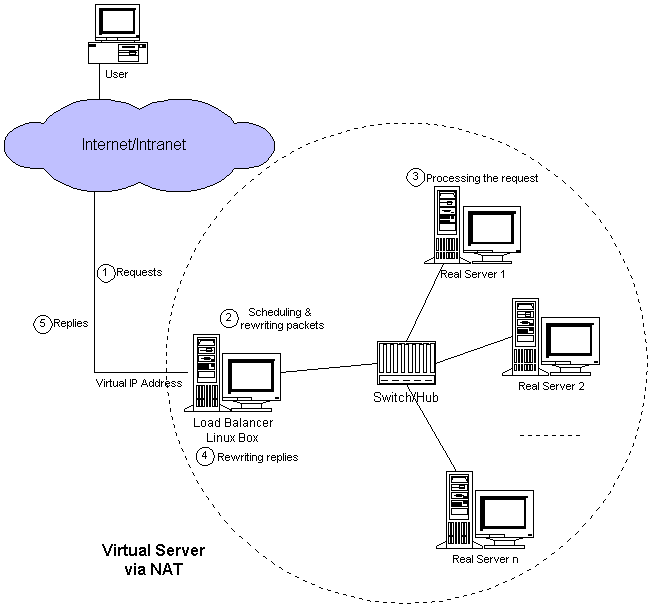
When a user accesses the service provided by the server cluster, the request packet destined for virtual IP address (the external IP address for the load balancer) arrives at the load balancer. The load balancer examines the packet’s destination address and port number. If they are matched for a virtual server service according to the virtual server rule table, a real server is chosen from the cluster by a scheduling algorithm, and the connection is added into the hash table which record the established connection. Then, the destination address and the port of the packet are rewritten to those of the chosen server, and the packet is forwarded to the server. When the incoming packet belongs to this connection and the chosen server can be found in the hash table, the packet will be rewritten and forwarded to the chosen server. When the reply packets come back, the load balancer rewrites the source address and port of the packets to those of the virtual service. After the connection terminates or timeouts, the connection record will be removed in the hash table.
当用户访问服务器集群提供的服务时,发往虚拟ip地址 (负载均衡器的外部ip地址) 的请求数据包到达负载均衡器。负载平衡器检查数据包的目标地址和端口号。如果根据虚拟服务器规则表将它们匹配为虚拟服务器服务,则通过调度算法从集群中选择真实服务器,并将连接添加到记录已建立连接的哈希表中。然后,将数据包的目的地址和端口重写为所选服务器的目的地址和端口(DNAT),并将数据包转发给服务器。当传入的数据包属于此连接并且可以在哈希表中找到所选服务器时,该数据包将被重写并转发到所选服务器。当回复数据包返回时,负载平衡器将数据包的源地址和端口重写为虚拟服务的源地址和端口(SNAT)。连接终止或超时后,连接记录将在哈希表中删除。
Confused? Let me give an example to make it clear. In the example, computers are configured as follows:
困惑吗?让我举一个例子来说明。在示例中,计算机的配置如下:
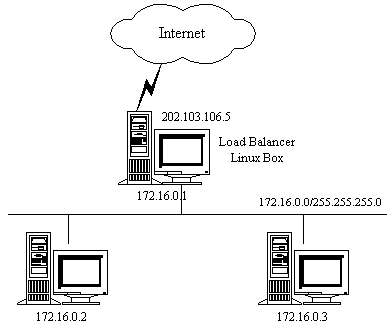
Note real servers can run any OS that supports TCP/IP, the default route of real servers must be the virtual server (172.16.0.1 in this example). The ipfwadm utility is used to make the virtual server accept packets from real servers. In the example above, the command is as follows:
注意真实服务器可以运行任何支持TCP/IP的操作系统,真实服务器的默认路由必须是虚拟服务器 (在本例中为172.16.0.1)。ipfwadm实用程序用于使虚拟服务器接受来自真实服务器的数据包。在上面的示例中,命令如下:
The following figure illustrates the rules specified in the Linux box with virtual server support.
下图展示了在支持虚拟服务器的Linux框中指定的规则。
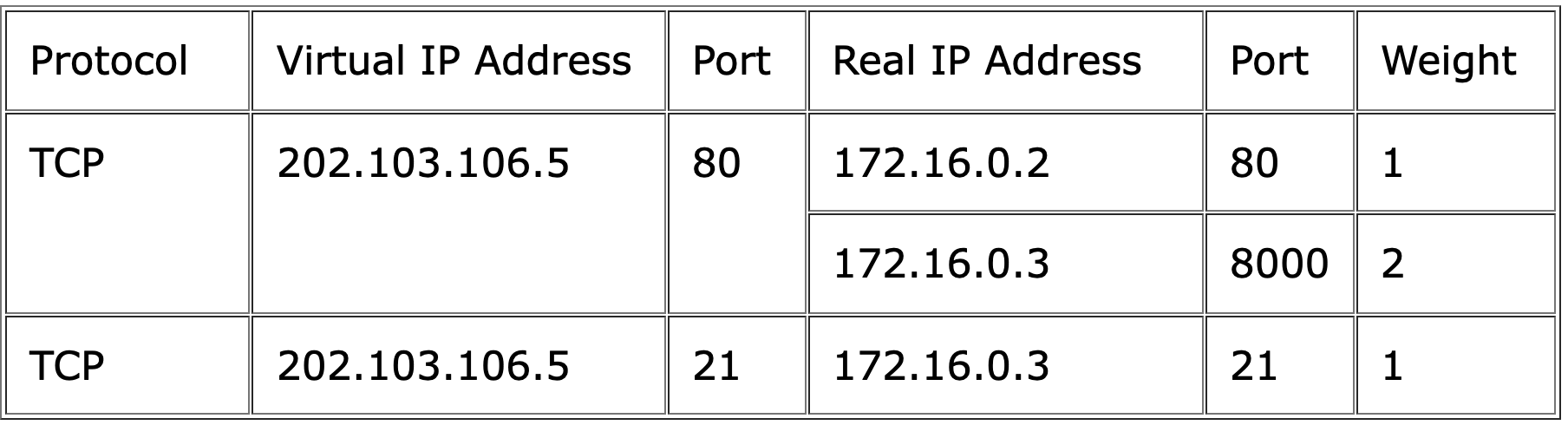
Packet rewriting works as follows.
数据包重写的工作原理如下。
The incoming packet for web service would has source and destination addresses as:
web服务的传入数据包的源地址和目标地址为:
The load balancer will choose a real server, e.g. 172.16.0.3:8000. The packet would be rewritten and forwarded to the server as:
负载平衡器将选择真实服务器,例如172.16.0.3:8000。数据包将被重写并转发到服务器,如下:
Replies get back to the load balancer as:
回复返回负载平衡器,如下:
The packets would be written back to the virtual server address and returned to the client as:
数据包将被写回虚拟服务器地址,并以以下方式返回给客户端:
How to build the kernel
First, get a fresh copy of the Linux kernel source of the right version. Second, apply the virtual server patch to the kernel. Third, make sure the following kernel compile options at least are selected.
首先,获取正确版本的linux内核源的新副本。其次,将虚拟服务器补丁应用于内核。第三,确保至少选择了以下内核编译选项。
1. The VS patch for kernel 2.0.36 or later
Kernel Compile Options:
And, you have to choice one scheduling algorithm.
Finally, rebuild the kernel. Once you have your kernel properly built, update your system kernel and reboot.
最后,重建内核。正确构建内核后,请更新系统内核并重新启动。
At last, build ippfvsadm utility from ippfvsadm.c program. And, the virtual server rules can be specified by ippfvsadm. For example, for the rules in the table above, we can use the following commands.
最后,从ippfvsadm.c程序构建ippfvsadm实用程序。并且,虚拟服务器规则可以由ippfvsadm指定。例如,对于上表中的规则,我们可以使用以下命令。
2. The IPVS patch for kernel 2.2.x
Kernel Compile Options:
Once you have your kernel properly built, update your system kernel and reboot. At last, change to the ipvsadm source and type “make install” to install ipvsadm into your system directory.
正确构建内核后,请更新系统内核并重新启动。最后,更改为ipvsadm源,然后键入 “进行安装” 以将ipvsadm安装到系统目录中。
To make the load balancer forward the masquerading packets
使负载平衡器转发伪装数据包
Add virtual service and link a scheduler to it
添加虚拟服务并将调度程序链接到它
Add real server and select forwarding method
添加真实服务器并选择转发方式
3. The IPVS patch for kernel 2.4.x
Kernel Compile Options:
The commands are similar to that of IPVS in kernel 2.2.*.