Virtual Server via Direct Routing
Virtual Server via Direct Routing
Like in the virtual server via tunneling approach, LinuxDirector processes only the client-to-server half of a connection in the virtual server via direct routing, and the response packets can follow separate network routes to the clients. This can greatly increase the scalability of virtual server.
与通过隧道方法在虚拟服务器中一样,LinuxDirector仅通过直接路由处理虚拟服务器中客户端到服务器的一半连接,并且响应数据包可以遵循到客户端的单独网络路由。这可以大大增加虚拟服务器的可扩展性。
Compared to the virtual server via IP tunneling approach, this approach doesn’t have tunneling overhead(In fact, this overhead is minimal in most situations), but requires that one of the load balancer’s interfaces and the real servers’ interfaces must be in the same physical segment.
与通过IP隧道方法的虚拟服务器相比,这种方法没有隧道开销 (实际上,这种开销在大多数情况下是最小的),但要求负载平衡器的接口和真实服务器的接口之一必须在同一物理段中。
Virtual Server via Direct Routing
This page contains information about working principle of the Direct Routing request dispatching technique and how to use it to contruct server clusters.
此页面包含有关直接路由请求调度技术的工作原理以及如何使用它来配置服务器集群的信息。
Direct Routing request dispatching technique
This request dispatching approach is similar to the one implemented in IBM’s NetDispatcher. The virtual IP address is shared by real servers and the load balancer. The load balancer has an interface configured with the virtual IP address too, which is used to accept request packets, and it directly route the packets to the chosen servers. All the real servers have their non-arp alias interface configured with the virtual IP address or redirect packets destined for the virtual IP address to a local socket, so that the real servers can process the packets locally. The load balancer and the real servers must have one of their interfaces physically linked by a HUB/Switch. The architecture of virtual server via direct routing is illustrated as follows:
这种请求调度方法类似于IBM的NetDispatcher中实现的方法。虚拟ip地址由真实服务器和负载均衡器共享。负载平衡器也有一个配置有虚拟ip地址的接口,该接口用于接受请求数据包,并且它将数据包直接路由到所选服务器。所有真实服务器的非arp别名接口都配置有虚拟ip地址,或者将发往虚拟ip地址的数据包重定向到本地套接字,以便真实服务器可以在本地处理数据包。负载平衡器和实际服务器必须具有通过集线器/交换机物理链接的接口之一。通过直接路由的虚拟服务器的体系结构如下所示:
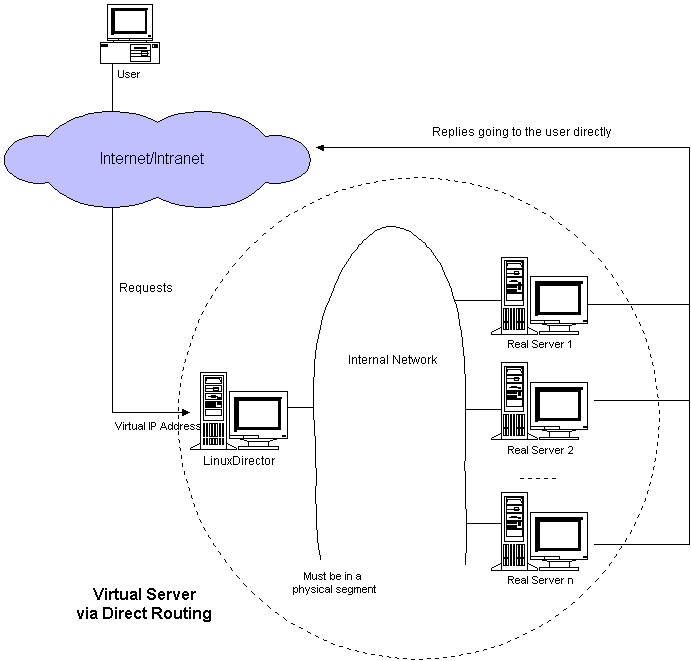
When a user accesses a virtual service provided by the server cluster, the packet destined for virtual IP address (the IP address for the virtual server) arrives. The load balancer(LinuxDirector) examines the packet’s destination address and port. If they are matched for a virtual service, a real server is chosen from the cluster by a scheduling algorithm, and the connection is added into the hash table which records connections. Then, the load balancer directly forwards it to the chosen server. When the incoming packet belongs to this connection and the chosen server can be found in the hash table, the packet will be again directly routed to the server. When the server receives the forwarded packet, the server finds that the packet is for the address on its alias interface or for a local socket, so it processes the request and return the result directly to the user finally. After a connection terminates or timeouts, the connection record will be removed from the hash table.
当用户访问服务器集群提供的虚拟服务时,发往虚拟ip地址 (虚拟服务器的ip地址) 的数据包到达。负载平衡器 (LinuxDirector) 检查数据包的目标地址和端口。如果它们与虚拟服务匹配,则通过调度算法从群集中选择真实服务器,并将连接添加到记录连接的哈希表中。然后,负载平衡器将其直接转发到所选服务器。当传入的数据包属于此连接并且可以在哈希表中找到所选服务器时,该数据包将再次直接路由到服务器。当服务器收到转发的数据包时,服务器发现该数据包是针对其别名接口上的地址或本地套接字的,因此它处理请求并最终将结果直接返回给用户。连接终止或超时后,连接记录将从哈希表中删除。
The direct routing workflow is illustrated in the following figure:
直接路由工作流如下图所示:
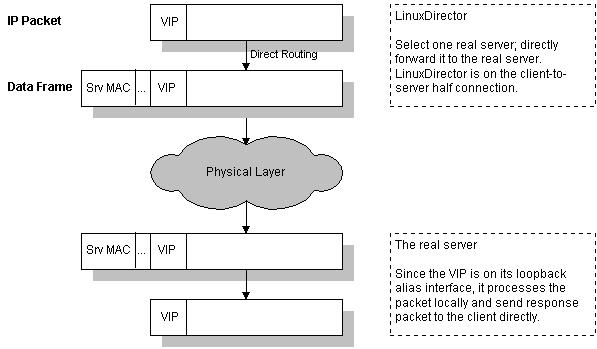
The load balancer simply changes the MAC address of the data frame to that of the chosen server and restransmits it on the LAN. This is the reason that the load balancer and each server must be directly connected to one another by a single uninterrupted segment of a LAN. If you meet some arp problem of the cluster, see the arp problem page for more information.
负载平衡器只需将数据帧的MAC地址更改为所选服务器的MAC地址,然后将其限制在LAN上。这就是负载平衡器和每个服务器必须通过LAN的单个不间断段直接相互连接的原因。如果您遇到集群的arp问题,请参见arp问题页面了解更多信息。
How to build the kernel
First, get a fresh copy of the Linux kernel source of the right version. Second, get a right version of IP virtual server patch and apply it to the kernel. Third, make sure that some kernel compile options must be selected. Fourth, rebuild the kernel. Once you have your kernel properly built, update your system kernel and reboot.
首先,获取正确版本的linux内核源的新副本。其次,获取正确版本的IP虚拟服务器补丁并将其应用于内核。第三,确保必须选择一些内核编译选项。第四,重建内核。正确构建内核后,请更新系统内核并重新启动。
1. The VS patch for kernel 2.0.36
Kernel Compile Options:
And, you have to choice one scheduling algorithm.
Finally, cd the ippfvsadm source and type “make install” to install ippfvsadm into your system directory.
最后,将ippfvsadm源cd并键入 “制作安装” 以将ippfvsadm安装到您的系统目录中。
2. The IPVS patch for kernel 2.2.x
Kernel Compile Options:
Finally, cd the ipvsadm source and type “make install” to install ipvsadm into your system directory, or install ipvsadm rpm package.
最后,将ipvsadm源cd并键入 “制作安装” 以将ipvsadm安装到您的系统目录中,或安装ipvsadm rpm软件包。
3. The IPVS patch for kernel 2.4.x
Kernel Compile Options:
My example for testing virtual server via direct routing
Here is my configure example for testing virtual server via direct routing. The configuration is as follows. I hope it can give you some clues. The load balancer has 172.26.20.111 address, and the real server 172.26.20.112. The 172.26.20.110 is the virtual IP address. In all the following examples, “telnet 172.26.20.110” will actually reach the real server.
这是我通过直接路由测试虚拟服务器的配置示例。配置如下。我希望它能给你一些线索。负载平衡器有172.26.20.111地址,真实服务器有172.26.20.112。172.26.20.110是虚拟ip地址。在以下所有示例中,“telnet 172.26.20.110” 实际上将到达真实服务器。
1. For kernel 2.0.x
The load balancer (LinuxDirector), kernel 2.0.36
The real server 1, kernel 2.0.36 (IP forwarding enabled)
When I am on other hosts, ‘telnet 172.26.20.110’ will actually connect the real server 1.
2. For kernel 2.2.x
The load balancer (LinuxDirector), kernel 2.2.14
The real server 1, kernel 2.0.36 (IP forwarding enabled)
More configuration examples
1. Real server running kernel 2.2.14 or later with hidden device
The load balancer (LinuxDirector), kernel 2.2.14
The real server 1, kernel 2.2.14
You can configure the VIP on alias of other devices like dummy and hide it. Since it is the alias interface, you can configure as many VIPs as you want. An example using dummy device is as follows:
您可以在其他设备 (例如dummy) 的别名上配置VIP并将其隐藏。由于是别名接口,您可以根据需要配置任意数量的vip。使用虚拟设备的示例如下:
2. Real servers runing kernel 2.2.x with redirect approach
The load balancer’s configuration is the same as the example above. Real servers running kernel 2.2.x can be configured as follows:
负载平衡器的配置与上面的示例相同。运行内核2.2.x的真实服务器可以配置如下:
With this ipchains redirect commands, packets destined for the address 172.26.20.110 port 23 and the tcp protocol will be redirected to a local socket. Note that the service daemon must listen on all addresses (0.0.0.0) or on the VIP address (172.26.20.110 here).
使用此ipchains重定向命令,发往地址172.26.20.110端口23和tcp协议的数据包将被重定向到本地套接字。请注意,服务守护程序必须侦听所有地址 (0.0.0.0) 或VIP地址 (此处为172.26.20.110)。
3. Real servers having different network routes
In the virtual server via direct routing, the servers can follows the different network routes to the clients (different Internet links), it is good for performance. The load balancer and real servers use a private LAN to communicate. Here is a configuration example.
在虚拟服务器中,通过直接路由,服务器可以遵循到客户端的不同网络路由 (不同的Internet链接),这对性能有好处。负载平衡器和真实服务器使用私有LAN进行通信。下面是一个配置示例。
The load balancer (LinuxDirector), kernel 2.2.14
The real server 1, kernel 2.0.36