Virtual Server via IP Tunneling
Virtual Server via IP Tunneling
In the virtual server via NAT, request and response packets all need to pass through the load balancer, the load balancer may be a new bottleneck when the number of server nodes increase to 20 or more, because the throughput of the network interface is limited eventually. We can see from many Internet services (such as web service) that the request packets are often short and response packets usually have large amount of data.
在虚拟服务器通过NAT、请求和响应数据包都需要通过负载平衡器,当服务器节点数量增加到20个或更多时,负载平衡器可能是一个新的瓶颈,因为网络接口的吞吐量最终受到限制。从许多Internet服务 (例如web服务) 中我们可以看到,请求数据包通常很短,并且响应数据包通常具有大量数据。
In the virtual server via IP tunneling, the load balancer just schedules requests to the different real servers, and the real servers return replies directly to the users. So, the load balancer can handle huge amount of requests, it may schedule over 100 real servers, and it won’t be the bottleneck of the system. :-) Thus using IP tunneling will greatly increase the maximum number of server nodes for a load balancer. The maximum throughput of the virtual server can reach over 1Gbps, even if the load balancer just has 100Mbps full-duplex network adapter.
在通过IP隧道的虚拟服务器中,负载平衡器只是将请求调度到不同的真实服务器,而真实服务器直接将答复返回给用户。因此,负载平衡器可以处理大量的请求,它可以调度超过100个实际服务器,它不会成为系统的瓶颈。:-) 因此,使用IP隧道将大大增加负载平衡器的服务器节点的最大数量。即使负载平衡器仅具有100Mbps的全双工网络适配器,虚拟服务器的最大吞吐量也可以达到1gbps以上。
The IP tunneling feature can be used to build a very high-performance virtual server. It is extremely good to build a virtual proxy server, because when the proxy servers get request, it can access the Internet directly to fetch objects and return them directly to the users.
IP隧道功能可用于构建非常高性能的虚拟服务器。构建虚拟代理服务器非常好,因为当代理服务器获得请求时,它可以直接访问Internet以获取对象并将其直接返回给用户。
However, all servers must have “IP Tunneling”(IP Encapsulation) protocol enabled, I just tested it on Linux IP tunneling. If you make virtual server work on servers running other operating systems with IP tunneling, please let me know, I will be glad to hear that.
但是,所有服务器都必须启用 “IP隧道” (IP封装) 协议,我刚刚在Linux IP隧道上进行了测试。如果您使虚拟服务器在运行具有IP隧道的其他操作系统的服务器上工作,请告诉我,我将很高兴听到这一消息。
Virtual Server via IP Tunneling
This page contains information about the working principle of Virtual Server via IP Tunneling and how to use IP Tunneling to greatly increase the scalability of server clusters.
本页包含有关通过IP隧道进行虚拟服务器的工作原理以及如何使用IP隧道来大大增加服务器群集的可伸缩性的信息。
IP tunneling
IP tunneling (IP encapsulation) is a technique to encapsulate IP datagram within IP datagrams, which allows datagrams destined for one IP address to be wrapped and redirected to another IP address. IP encapsulation is now commonly used in Extranet, Mobile-IP, IP-Multicast, tunneled host or network. Please see the NET-3-HOWTO document for details.
IP隧道 (IP封装) 是一种将IP数据报封装在IP数据报中的技术,它允许将发往一个ip地址的数据报包装并重定向到另一个ip地址。IP封装现在通常用于Extranet,Mobile-IP,IP-多播,隧道主机或网络中。详情请见NET-3-HOWTO文件。
How to use IP tunneling on virtual server
First, let’s look at the figure of virtual server via IP tunneling. The most different thing of virtual server via IP tunneling to that of virtual server via NAT is that the load balancer sends requests to real servers through IP tunnel in the former, and the load balancer sends request to real servers via network address translation in the latter.
首先,让我们看一下通过IP隧道的虚拟服务器的图。虚拟服务器通过IP隧道与虚拟服务器通过NAT最大的不同之处在于,前者中负载平衡器通过IP隧道向真实服务器发送请求,后者中负载平衡器通过网络地址转换向真实服务器发送请求。
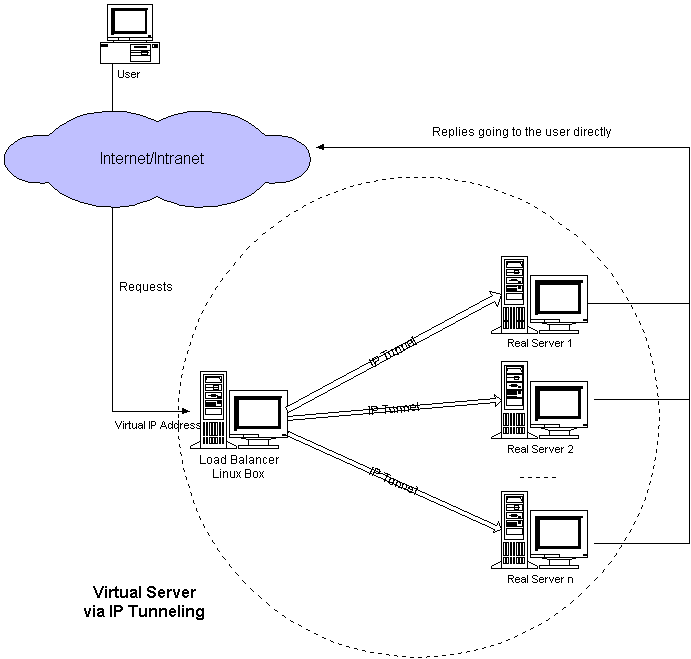
When a user accesses a virtual service provided by the server cluster, a packet destined for virtual IP address (the IP address for the virtual server) arrives. The load balancer examines the packet’s destination address and port. If they are matched for the virtual service, a real server is chosen from the cluster according to a connection scheduling algorithm, and the connection is added into the hash table which records connections. Then, the load balancer encapsulates the packet within an IP datagram and forwards it to the chosen server. When an incoming packet belongs to this connection and the chosen server can be found in the hash table, the packet will be again encapsulated and forwarded to that server. When the server receives the encapsulated packet, it decapsulates the packet and processes the request, finally return the result directly to the user according to its own routing table. After a connection terminates or timeouts, the connection record will be removed from the hash table. The workflow is illustrated in the following figure.
当用户访问服务器集群提供的虚拟服务时,发往虚拟ip地址 (虚拟服务器的ip地址) 的数据包到达。负载平衡器检查数据包的目标地址和端口。如果它们与虚拟服务匹配,则根据连接调度算法从集群中选择真实服务器,并将该连接添加到记录连接的哈希表中。然后,负载平衡器将数据包封装在IP数据报中,并将其转发到所选服务器。当传入的数据包属于此连接并且可以在哈希表中找到所选服务器时,该数据包将再次被封装并转发到该服务器。当服务器收到封装的数据包后,对数据包进行解封装并处理请求,最后根据自己的路由表将结果直接返回给用户。连接终止或超时后,连接记录将从哈希表中删除。工作流程如下图所示。
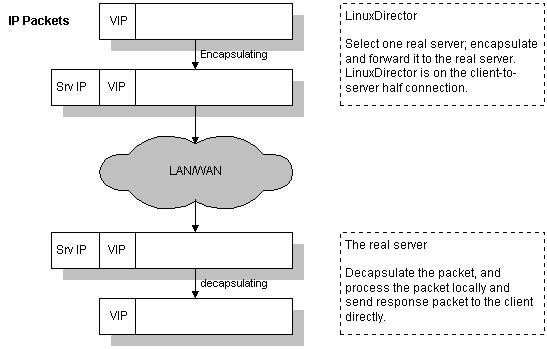
Note that real servers can have any real IP address in any network, they can be geographically distributed, but they must support IP encapsulation protocol. Their tunnel devices are all configured up so that the systems can decapsulate the received encapsulation packets properly, and the
请注意,真实服务器可以在任何网络中具有任何真实的ip地址,它们可以在地理上分布,但是它们必须支持IP封装协议。它们的隧道设备都已配置好,以便系统可以正确地对接收到的封装数据包进行解封装,并且必须在非arp设备或非arp设备的任何别名上配置 <虚拟ip地址>,或者系统可以配置为将 <虚拟ip地址> 的数据包重定向到本地套接字。有关更多信息,请参见arp问题页面。
Finally, when an encapsulated packet arrives, the real server decapsulates it and finds that the packet is destined for
最后,当一个封装的数据包到达时,真正的服务器对它进行解封装,发现该数据包的目的地是 <虚拟ip地址>,它说,“哦,它是给我的,所以我做了。”,它处理请求并最终将结果直接返回给用户。
How to build the kernel
First, get a fresh copy of the Linux kernel source of the right version. Second, get a right version of IP virtual server patch and apply it to the kernel. Third, make sure that some kernel compile options must be selected. Fourth, rebuild the kernel. Once you have your kernel properly built, update your system kernel and reboot.
首先,获取正确版本的linux内核源的新副本。其次,获取正确版本的IP虚拟服务器补丁并将其应用于内核。第三,确保必须选择一些内核编译选项。第四,重建内核。正确构建内核后,请更新系统内核并重新启动。
1. The VS patch for kernel 2.0.36
Kernel Compile Options:
And, you have to choice one scheduling algorithm.
而且,您必须选择一种调度算法。
Finally, cd the ippfvsadm source and type “make install” to install ippfvsadm into your system directory.
最后,将ippfvsadm源cd并键入 “制作安装” 以将ippfvsadm安装到您的系统目录中。
2. The VS patch for kernel 2.2.x
Kernel Compile Options:
Finally, cd the ipvsadm source and type “make install” to install ipvsadm into your system directory, or install ipvsadm rpm package.
最后,将ipvsadm源cd并键入 “制作安装” 以将ipvsadm安装到您的系统目录中,或安装ipvsadm rpm软件包。
3. The IPVS patch for kernel 2.4.x
Kernel Compile Options:
How to use it
Let’s give an example to see how to use it. The following table illustrates the rules specified in the Linux box with virtual server via IP tunneling. Note that the services running on the real servers must run on the same port as virtual service, so it is not necessary to specify the service port on the real servers.
让我们举一个例子,看看如何使用它。下表说明了通过IP隧道在带有虚拟服务器的Linux框中指定的规则。请注意,在真实服务器上运行的服务必须与虚拟服务在同一端口上运行,因此不必在真实服务器上指定服务端口。
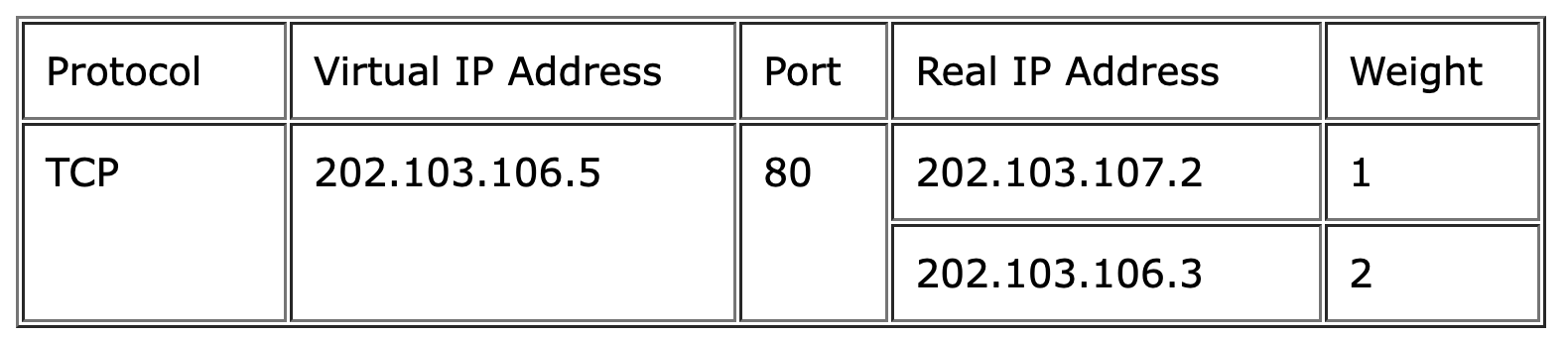
All traffic destined for IP address 202.103.106.5 Port 80 is load-balanced over real IP address 202.103.107.2 Port 80 and 202.103.106.3 Port 80.
发往ip地址202.103.106.5端口80的所有流量在真实ip地址202.103.107.2端口80和202.103.106.3端口80上进行负载平衡。
We can use the following commands to specify the rules in the table above in the system.
我们可以使用以下命令在系统中指定上表中的规则。
1. For kernel 2.0.x
2. For kernel 2.2.x / kernel 2.4.x / kernel 2.6.x
My example for testing virtual server via tunneling
Here is my configure example for testing virtual server via tunneling. The configuration is as follows. I hope it can give you some clues. The load balancer has 172.26.20.111 address, and the real server 172.26.20.112. The 172.26.20.110 is the virtual IP address. In all the following examples, “telnet 172.26.20.110” will actually reach the real server.
这是我通过隧道测试虚拟服务器的配置示例。配置如下。我希望它能给你一些线索。负载平衡器有172.26.20.111地址,真实服务器有172.26.20.112。172.26.20.110是虚拟ip地址。在以下所有示例中,“telnet 172.26.20.110” 实际上将到达真实服务器。
1. For kernel 2.0.x
The load balancer (LinuxDirector), kernel 2.0.36
The real server 1, kernel 2.0.36 (IP forwarding enabled)
When I am on other hosts, ‘telnet 172.26.20.110’ will actually connect the real server 1.
当我在其他主机上时,‘telnet 172.26.20.110 ‘实际上将连接真正的服务器1。
2. For kernel 2.2.x
The load balancer (LinuxDirector), kernel 2.2.14
The real server 1, kernel 2.0.36 (IP forwarding enabled)
More configuration examples
Here are more configuration examples of virtual server via IP tunneling. In order to save space, just important commands are put and less importants are omitted.
以下是通过IP隧道进行虚拟服务器的更多配置示例。为了节省空间,仅放置重要命令,而省略了较少的重要内容。
1. Real server running kernel 2.2.14 or later with hidden device
The load balancer (LinuxDirector), kernel 2.2.14
The real server 1, kernel 2.2.14
Since the kernel 2.2 just has one tunnel device tunl0, you can only have one VIP in this configuration. For multiple VIPs, you can make the tunl0 device up, and configure them on aliases of tunnel/dummy/loopback devices and hide that device. An example is as follows:
由于内核2.2只有一个隧道设备tunl0,因此在此配置中只能有一个VIP。对于多个vip,您可以制作tunl0设备,并在隧道/虚拟/环回设备的别名上配置它们并隐藏该设备。一个例子如下:
2. Real servers runing kernel 2.2.x with redirect approach
The load balancer’s configuration is the same as the example above. Real servers running kernel 2.2.x can be configured as follows:
负载平衡器的配置与上面的示例相同。运行内核2.2.x的真实服务器可以配置如下: